VOpilotPRODUCT TOUR
01 / 10
vopilot.co/app/dashboard
Meet VOpilot
Step 01 · Dashboard

Meet VOpilot

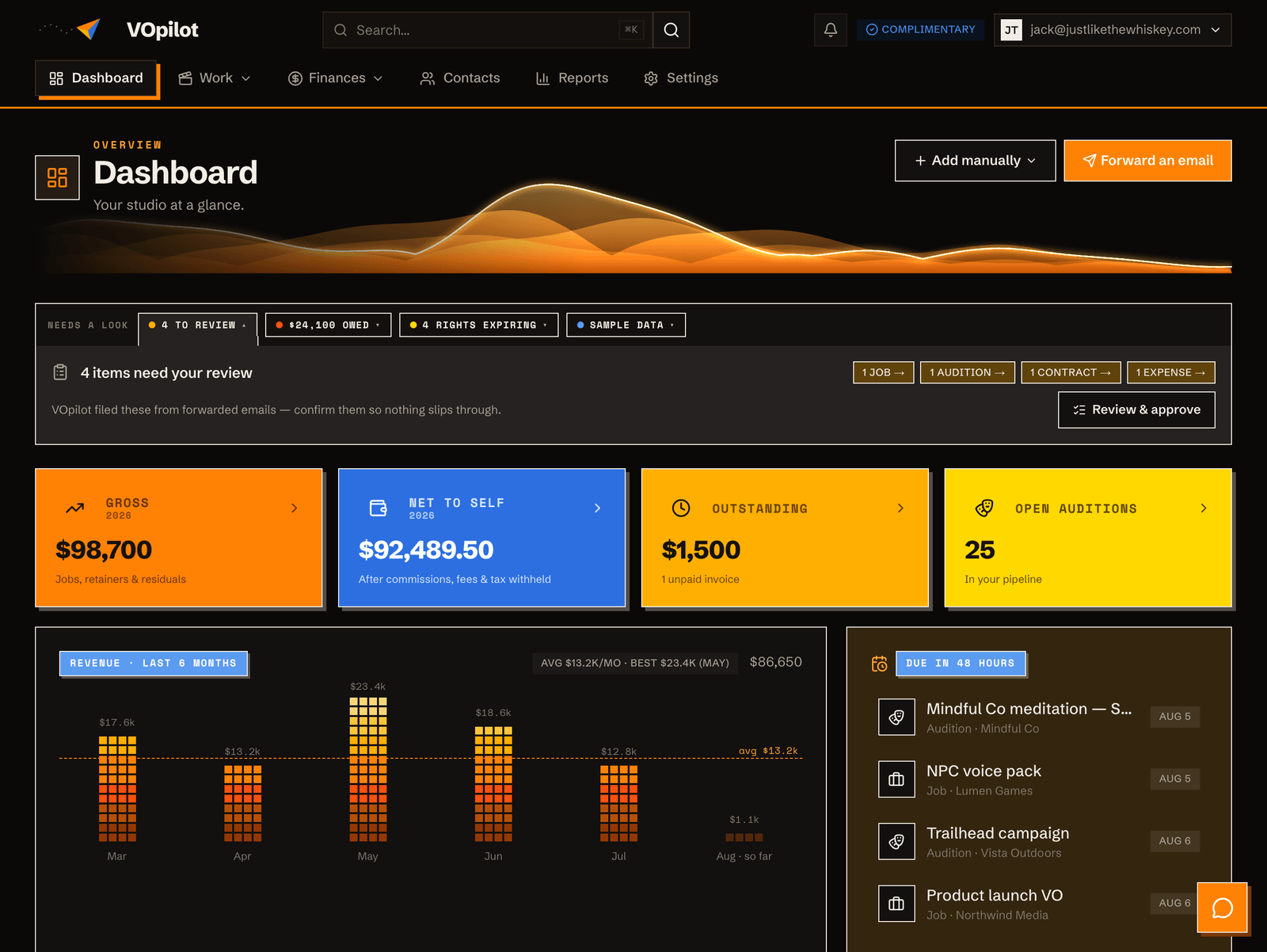
Forward your work emails and they file themselves — then gather right here under “Needs your review.” Here's how it works.

Step 01 · Dashboard

Meet VOpilot

Forward your work emails and they file themselves — then gather right here under “Needs your review.” Here's how it works.

1 of 10

That's the whole idea. Start forwarding and watch your business file itself.

Start free

More tours

Get paid, not just billed

Invoice a job, send a branded bill, and collect by card or PayPal — straight to your own bank.

Agreements that read themselves✳ New

Forward a contract or retainer and VOpilot parses every term, tracks the payments, and reminds you before deadlines.

Run your whole audition pipeline✳ New

Forward an audition, move it across stages, see the full parsed brief, and convert a win straight into a job.

Coaching, without the spreadsheet✳ New

Coaching is a kind of job here — sessions ask coaching questions (length, focus, materials), your rate card prices them, packs count down, workshops track every seat, and Reports shows what teaching earns.

Never lose a residual

Track every usage residual and SAG holding fee — by spot and cycle, gross and your net after commission.

Know your business cold✳ New

Income by client, type and month; agent commissions; coaching; aging; pay-to-play ROI; seasonality; your typical rate; the relationship map; and a tax-ready Schedule C — one tab each, most a click from CSV.

A CRM that fills itself in✳ New

An address book that builds itself — companies and their people, typed automatically, enriched from your inbox.

Never let usage rights lapse

Track when a job's usage rights and exclusivity hold expire — and get nudged in time to renew, re-bill, or take competing work, instead of letting it slip for free.

See the money before it lands✳ New

Ninety days of expected cash, ranked by how certain it is — what's scheduled, what's invoiced, and what you've earned but not yet billed.
By feature

Log an audition by hand✳ New

No email to forward? Enter an audition yourself — a short form, the client autocompleting from your contacts — and it lands in your To Do queue.

Capture the conversation✳ New

Forward the emails that aren't bookings — negotiations, notes, scheduling — and they file to the right person, searchable from their profile and plotted on your Timeline.

Add contacts from your email

One button, two ways in: pull the senders from emails you've already forwarded (no setup), or connect your mailbox and import everyone you correspond with.

Select, edit, or merge contacts✳ New

Tick any number of contacts, then act on them together — change their category, set their company, or merge duplicates without losing a single job or invoice.

Put your CRM to work✳ New

Email a whole segment — AI-drafted, personalized, replies to you — or take the list with you as a CSV.

Track a job✳ New

Every booking on one page — the brief, the dates, agent commissions, and exactly what you take home.

Build a branded invoice✳ New

Pull in a job or start fresh, itemize it, and send a bill that carries your logo and name — with a built-in pay link.

Your dashboard✳ New

The home screen: gross and take-home income, outstanding invoices, live auditions, a revenue chart, your top clients, and a timeline of the year.

Your timeline✳ New

Every job and audition plotted across time — jobs above the line, auditions below, sized by fee and colored by status. Zoom from years to a single day and click anything to open it.

Log an expense✳ New

Snap or forward a receipt and VOpilot reads it, files it to the right Schedule C line, and keeps your deductible total ready all year.

Agents & commission splits

Set each agent's rate once, split any job between them with a click, and watch your true take-home compute itself — gross, every cut, and your net.

Your demo site✳ New

A free one-page site at vopilot.co/you — demos, rates, and a booking button — with layouts, styles, and accent colors tuned against a live example.

Ask the assistant

A built-in assistant on every page — ask how anything works or about your own account, and get a grounded answer on the spot.

Voice input✳ New

Tap the mic and say a name instead of typing — the recognizer is primed with your own contacts, so it hears voiceover names right and filters in an instant.

Income ledger✳ New

Jobs, retainers, and residuals in one chronological feed — gross and your true net side by side, read by when you earned it or when it landed, and a click from the record behind each line.

Review & approve your drafts✳ New

Everything VOpilot files from forwarded emails waits in one place — tick the ones you know are right and approve them in a batch.

Find the produced spot✳ New

The Screening Room tracks down the finished ad an audition or job became — verify it against your script, pin it, study the winning read, and collect it all on the Wall. Pro and up.

The Wall✳ New

Every produced piece you've pinned, hung in one playable gallery — verified against your script, a click from its job or audition — with your coaching notebook beneath it.

Your audio take archive✳ New

File the audio you sent on any audition or job, play it back anytime, and search every take by client, project, or what you actually said.

Search anything

One box across your whole account — jobs, contacts, invoices, auditions, expenses, agreements, and residuals — plus a jump-to-any-page shortcut. Press ⌘K from anywhere.

Reminders — nudges you set✳ New

Tell VOpilot what to chase — a spot in a week, a Monday post, a follow-up — attached to a record or on its own, with one morning email when it's due.

The Planner✳ New

Your month, week, or day on one grid — reminders colored by category beside sessions, deadlines, audition due dates, and expected payments, with a feed your real calendar can subscribe to.

Money watch✳ New

One page that reconciles what you're owed against what actually arrived — late invoices, delivered work you never billed, missed installments, and payments that came up short.

Agent commissions✳ New

Every commission your jobs owe each agent, grouped and totalled — tick what you're paying, set the date, done.

Tax readiness✳ New

A year-end check of your Schedule C, built from your own records — what's deductible, what needs a look, and what the quarterly estimate comes to.

Is your pay-to-play worth it?✳ New

Tag where each audition came from, log what the membership costs, and let the year answer the question — per platform, in dollars.

Booth mode✳ New

Today on one screen — a live clock, what's next with a countdown, and the script a tap away. Built to sit on a second monitor while you record.

Ask your business✳ New

Plain questions about your own numbers — how the year is tracking, who to chase, where you actually book — answered from your books, or not at all.

Deliver your files✳ New

Upload each job's takes to the job itself — kept as versions, sent as a branded page the client can play, download, and approve.

Your other calendars✳ New

Put your Google, Outlook, or Apple appointments on the Planner as a read-only layer — so a session never lands on top of something you'd forgotten.

Momentum✳ New

Half a year of showing up, as a heat strip — plus your personal bests, framed as records to beat rather than streaks to break.

Rate lens✳ New

What your typical job actually goes for — by genre, by client, quarter over quarter — and who's paying under your median.

The shape of your year✳ New

A radial of this year's gross over last year's, with your historically strongest and quietest months named — so you see the slow weeks coming.

Client constellation✳ New

Your whole book of business as a night sky — every contact a star, sized by lifetime billing and cooling as they go quiet.

Audition intelligence✳ New

Your conversion physics — where you actually book, counted over real decisions only, with no slice allowed to claim a rate it can't support.

Year in Voice✳ New

Your year played back as a story — auditions, streaks, bookings, top clients — ending in a share card built for posting.

Import from Wave✳ New

Bring your Wave customers and invoices across — including the one export setting that decides whether your invoices arrive with real descriptions or a generic “Services” line.

Export your contacts✳ New

Filter to the set you want and take it as a spreadsheet — the export is exactly what's on screen, and it never leaves your machine.

Auto-forward from Gmail✳ New

The advanced, optional path — and the one step people get stuck on, because Gmail's confirmation code goes to an inbox that never shows you mail.

Walk me through it✳ New

Not sure which form you want? Answer a few plain questions instead — or forward the email and answer none.

Already using VOpilot? The same tours sit inside the app in Help, filed under the question you came in with — each one with written steps beside it.